Lesson 4
Set Up the Gear
Clean the lens, insert the SD card, and lock in your tripod height.
Your progress4Set Up the Gear5Camera Connection
Start here
Work through each step in order, then mark the lesson complete when you are ready to continue.
Get your camera and tripod ready before entering the property. A sturdy tripod about 3 to 4 feet tall gives the most consistent results. You can finish the whole job on a phone, but a laptop upload is often much faster.
A Clean the Lens
360 cameras have bulging lenses that attract fingerprints. Use a microfiber cloth to wipe both sides of the lens. A single fingerprint will blur an entire room.
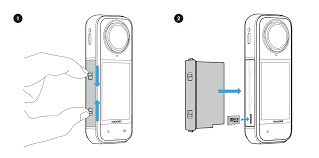
B Insert the SD Card
If you are using an Insta360 camera, ensure a formatted SD card is inserted, or it won't save the scans.
C Set the Tripod
Mount your camera on a sturdy tripod about 3 to 4 feet tall. Keep that height for the whole job.
⚠️NEVER adjust the tripod height once you set it. If you raise or lower it mid-scan, the final virtual tour will feel like a roller coaster when people click through it.